

Most Next.js projects start clean. A few pages, some components, a data fetching layer. Six months later, the codebase is a tangle of API calls inside components, business logic in useEffect hooks, and styles hardcoded into JSX.
This guide teaches you how to build Next.js applications that stay clean as they grow — using Feature-First Clean Architecture.
Why Architecture Matters
I've worked on codebases where a single component was 800 lines long. It fetched data, handled form validation, managed loading states, made API calls, styled itself, and contained business rules. Changing one thing broke three others.

The root cause wasn't bad developers. It was the absence of boundaries.
Clean Architecture gives you boundaries. Feature-First organizing gives you scalability. Together, they give you a codebase that adapts to change instead of resisting it.
The Dependency Rule
Before anything else, understand this one rule:
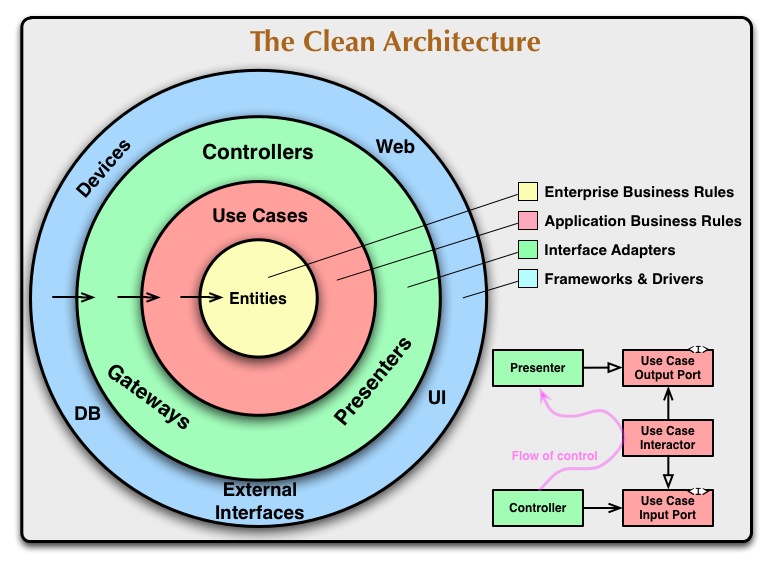
Source code dependencies can only point inward.
The architecture has four concentric layers:
Framework (outermost)
    ↓
Presentation
    ↓
Application
    ↓
Infrastructure (innermost)
Each layer can only import from layers inside it. Nothing in an inner layer can know about an outer layer.
This is non-negotiable. Break this rule and the entire system unravels.
The Four Layers
Framework Layer
Purpose: Connect your application to the framework.
In a Next.js project, this is the app/ directory. It contains:
- Routes and page entry points
- Layouts
- Route handlers
- Middleware
It should be extremely thin. A page file should be 3-5 lines:
// app/dashboard/page.tsx
import { DashboardPage } from "@/presentation/features/dashboard/dashboard-page";

export default function DashboardRoute() {
  return <DashboardPage />;
}
That's it. No business logic. No API calls. No state management.
Presentation Layer
Purpose: Render information.
This layer decides what users see and how they interact with it. It contains:
- Feature pages and components
- Atomic UI components (Button, Input, Badge)
- Layout components (Sidebar, Navbar)
- Component-level styles
Presentation receives data from Application hooks and displays it. It does not know where data comes from.
// presentation/features/auth/login-page.tsx
"use client";

import { useAuth } from "@/application/hooks/use-auth";
import { Button } from "@/presentation/_components/button";

export function LoginPage() {
  const { login, loading } = useAuth();

  return (
    <form onSubmit={login}>
      <Button loading={loading}>Sign In</Button>
    </form>
  );
}
Application Layer
Purpose: Coordinate business behavior.
This is the brain. It contains:
- Hooks that orchestrate data flow
- Zustand stores for client state
- Validators (Zod schemas)
- Business constants and types
- Content strings
- Mappers (external → internal data shapes)
Application hooks answer: How does this screen get data? How is state managed? What business rules apply?
// application/hooks/use-auth.ts
import { create } from "zustand";
import { authApi } from "@/infrastructure/api/auth.api";
import { SignInSchema } from "@/application/validators/auth.validator";

export function useAuth() {
  const [loading, setLoading] = useState(false);

  async function login(email: string, password: string) {
    const parsed = SignInSchema.safeParse({ email, password });
    if (!parsed.success) return;

    setLoading(true);
    try {
      await authApi.signIn(parsed.data);
    } finally {
      setLoading(false);
    }
  }

  return { login, loading };
}
Infrastructure Layer
Purpose: Talk to the outside world.
This layer handles:
- REST/GraphQL API clients
- Database connections
- Local storage / cookies
- Analytics
- Mock data for development
Infrastructure knows how to communicate. It does not know what the business means.
// infrastructure/api/auth.api.ts
import { commonApi } from "./common.api";

export const authApi = {
  signIn: async (data: { email: string; password: string }) => {
    return commonApi.post("/auth/sign-in", data);
  },
  signOut: async () => {
    return commonApi.post("/auth/sign-out");
  },
};
The Four Dependency Rules
- Framework can import Presentation
- Presentation can import Application
- Application can import Infrastructure
- Never import upward
That's it. Four rules. Memorize them.
app/           →  presentation/
presentation/  →  application/
application/   →  infrastructure/

infrastructure ✗  presentation
infrastructure ✗  app
application    ✗  presentation
application    ✗  app
presentation   ✗  app
The Directory Structure
Here's the complete src/ tree for a Feature-First Clean Architecture Next.js project:

src/
├── app/                              # Framework Layer
│   ├── layout.tsx
│   ├── page.tsx
│   ├── blog/
│   │   └── [slug]/
│   │       └── page.tsx
│   ├── dashboard/
│   │   └── page.tsx
│   └── settings/
│       └── page.tsx
│
├── infrastructure/                   # External Systems
│   ├── api/
│   │   ├── common.api.ts
│   │   ├── auth.api.ts
│   │   ├── posts.api.ts
│   │   └── user.api.ts
│   ├── mocks/
│   │   ├── auth.mock.ts
│   │   └── posts.mock.ts
│   └── storage/
│       ├── local-storage.ts
│       └── cookies.ts
│
├── application/                      # Business Logic
│   ├── hooks/
│   │   ├── use-auth.ts
│   │   ├── use-posts.ts
│   │   └── use-user.ts
│   ├── stores/
│   │   ├── auth.store.ts
│   │   └── theme.store.ts
│   ├── validators/
│   │   ├── auth.validator.ts
│   │   └── posts.validator.ts
│   ├── constants/
│   │   └── app.constants.ts
│   ├── types/
│   │   ├── auth.types.ts
│   │   └── posts.types.ts
│   ├── content/
│   │   └── common.content.ts
│   └── mappers/
│       └── posts.mapper.ts
│
├── presentation/                     # UI Layer
│   ├── _components/
│   │   ├── button.tsx
│   │   ├── input.tsx
│   │   ├── badge.tsx
│   │   ├── spinner.tsx
│   │   └── modal.tsx
│   ├── _styles/
│   │   └── shared.styles.ts
│   ├── features/
│   │   ├── auth/
│   │   │   ├── login-page.tsx
│   │   │   └── signup-page.tsx
│   │   ├── blog/
│   │   │   ├── blog-listing-page.tsx
│   │   │   └── blog-post-page.tsx
│   │   ├── dashboard/
│   │   │   └── dashboard-page.tsx
│   │   └── settings/
│   │       └── settings-page.tsx
│   └── layout/
│       ├── header.tsx
│       ├── footer.tsx
│       └── page-frame.tsx
│
├── shared/                           # Cross-Cutting
│   ├── types/
│   │   └── common.types.ts
│   ├── constants/
│   │   └── shared.constants.ts
│   └── enums/
│       └── roles.enum.ts
│
└── lib/                              # Utilities
    ├── utils.ts
    ├── env.ts
    └── cn.ts
Building a Feature: Auth
Let's build a complete authentication feature following the architecture.
Step 1: Types (Application)
// application/types/auth.types.ts
export interface User {
  id: string;
  email: string;
  name: string;
  role: "admin" | "user";
}

export interface SignInCredentials {
  email: string;
  password: string;
}

export interface SignUpData extends SignInCredentials {
  name: string;
}
Step 2: Validator (Application)
// application/validators/auth.validator.ts
import { z } from "zod";

export const SignInSchema = z.object({
  email: z.string().email("Invalid email address"),
  password: z.string().min(8, "Password must be at least 8 characters"),
});

export const SignUpSchema = z.object({
  name: z.string().min(2, "Name must be at least 2 characters"),
  email: z.string().email("Invalid email address"),
  password: z.string().min(8, "Password must be at least 8 characters"),
  confirmPassword: z.string(),
}).refine((data) => data.password === data.confirmPassword, {
  message: "Passwords don't match",
  path: ["confirmPassword"],
});

export type SignInInput = z.infer<typeof SignInSchema>;
export type SignUpInput = z.infer<typeof SignUpSchema>;
Step 3: API Client (Infrastructure)
// infrastructure/api/auth.api.ts
import { commonApi } from "./common.api";
import type { SignInInput, SignUpInput } from "@/application/types/auth.types";

export const authApi = {
  signIn: async (data: SignInInput) => {
    const response = await commonApi.post<{ token: string; user: User }>(
      "/auth/sign-in",
      data
    );
    return response;
  },

  signUp: async (data: SignUpInput) => {
    const response = await commonApi.post<{ token: string; user: User }>(
      "/auth/sign-up",
      data
    );
    return response;
  },

  signOut: async () => {
    await commonApi.post("/auth/sign-out");
  },

  getProfile: async () => {
    const response = await commonApi.get<User>("/auth/me");
    return response;
  },
};
Step 4: Store (Application)
// application/stores/auth.store.ts
import { create } from "zustand";
import type { User } from "@/application/types/auth.types";

interface AuthState {
  user: User | null;
  loading: boolean;
  setUser: (user: User | null) => void;
  setLoading: (loading: boolean) => void;
}

export const useAuthStore = create<AuthState>((set) => ({
  user: null,
  loading: true,
  setUser: (user) => set({ user }),
  setLoading: (loading) => set({ loading }),
}));
Step 5: Hook (Application)
// application/hooks/use-auth.ts
"use client";

import { useEffect } from "react";
import { useRouter } from "next/navigation";
import { useAuthStore } from "@/application/stores/auth.store";
import { authApi } from "@/infrastructure/api/auth.api";
import { SignInSchema } from "@/application/validators/auth.validator";
import type { SignInInput } from "@/application/types/auth.types";

export function useAuth() {
  const { user, loading, setUser, setLoading } = useAuthStore();
  const router = useRouter();

  useEffect(() => {
    authApi
      .getProfile()
      .then(setUser)
      .catch(() => setUser(null))
      .finally(() => setLoading(false));
  }, [setUser, setLoading]);

  async function signIn(credentials: SignInInput) {
    const parsed = SignInSchema.safeParse(credentials);
    if (!parsed.success) {
      return { error: parsed.error.flatten().fieldErrors };
    }

    try {
      const { user } = await authApi.signIn(parsed.data);
      setUser(user);
      router.push("/dashboard");
      return { error: null };
    } catch {
      return { error: { general: ["Invalid credentials"] } };
    }
  }

  async function signOut() {
    await authApi.signOut();
    setUser(null);
    router.push("/");
  }

  return { user, loading, signIn, signOut };
}
Step 6: Page (Presentation)
// presentation/features/auth/login-page.tsx
"use client";

import { useState } from "react";
import { useAuth } from "@/application/hooks/use-auth";
import { Button } from "@/presentation/_components/button";
import { Input } from "@/presentation/_components/input";

export function LoginPage() {
  const { signIn, loading } = useAuth();
  const [email, setEmail] = useState("");
  const [password, setPassword] = useState("");
  const [errors, setErrors] = useState<Record<string, string[]>>({});

  async function handleSubmit(e: React.FormEvent) {
    e.preventDefault();
    const result = await signIn({ email, password });
    if (result.error) setErrors(result.error);
  }

  return (
    <div className="max-w-md mx-auto mt-20">
      <h1 className="text-2xl font-bold mb-8">Sign In</h1>
      <form onSubmit={handleSubmit} className="space-y-4">
        <Input
          label="Email"
          type="email"
          value={email}
          onChange={setEmail}
          error={errors.email?.[0]}
        />
        <Input
          label="Password"
          type="password"
          value={password}
          onChange={setPassword}
          error={errors.password?.[0]}
        />
        {errors.general && (
          <p className="text-red-500 text-sm">{errors.general[0]}</p>
        )}
        <Button loading={loading} fullWidth>Sign In</Button>
      </form>
    </div>
  );
}
Step 7: Route (Framework)
// app/(auth)/login/page.tsx
import { LoginPage } from "@/presentation/features/auth/login-page";

export default function LoginRoute() {
  return <LoginPage />;
}
That's the full flow. Seven files. Each with one responsibility. Each testable in isolation.
Content Separation
User-facing text should not live inside components.
Bad:
<Button>Create Workspace</Button>Good:
// application/content/workspace.content.ts
export const workspaceContent = {
  createButton: "Create Workspace",
  emptyState: "No workspaces yet. Create your first one.",
  deleteConfirm: "Are you sure you want to delete this workspace?",
};

// presentation/features/workspace/workspace-page.tsx
import { workspaceContent } from "@/application/content/workspace.content";

<Button>{workspaceContent.createButton}</Button>
Why? Because:
- Localization becomes trivial
- Copy changes don't require component edits
- AI agents can find and update content without touching UI logic
- The UI becomes content-driven
Mock Architecture
Mocks are not fake APIs. They are development infrastructure.
Every API should be replaceable by a mock:
// infrastructure/mocks/auth.mock.ts
import type { User } from "@/application/types/auth.types";

const mockUser: User = {
  id: "1",
  email: "dev@100xsystems.dev",
  name: "Developer",
  role: "admin",
};

export const authMock = {
  signIn: async () => ({ token: "mock-token", user: mockUser }),
  signOut: async () => {},
  getProfile: async () => mockUser,
};
Switch between real and mock at the Infrastructure boundary — no UI changes needed.
Common Pitfalls
1. Business Logic in Components
If your component contains if statements about business rules, that logic belongs in Application.
2. API Calls in Presentation
Never call fetch() or an API client from a component. Use an Application hook.
3. Framework Imports in Infrastructure
Infrastructure cannot import from next/navigation, next/image, or any framework package. It talks to the outside world only.
4. Duplicated Types
Define types once in application/types/. Import everywhere. Never copy-paste type definitions.
5. Skipping Mappers
External APIs return snake_case. Your UI wants camelCase. Map between them. Don't leak API shapes into your presentation.
Testing Strategy
Each layer has its own testing approach:
- Infrastructure: Integration tests against real APIs or mocked HTTP
- Application: Unit tests for hooks, validators, mappers, stores
- Presentation: Component tests with mocked hooks
- Framework: E2E tests (Playwright/Cypress)
The architecture makes this natural. Because dependencies point inward, you can mock any outer layer when testing an inner one.
Conclusion
Clean Architecture isn't about adding complexity. It's about adding boundaries that make complexity manageable.
The Feature-First approach scales this further by organizing code around what your product does, not what technology you use.
Start with the Dependency Rule. Separate your concerns. Keep each file answering one question.
Your future self — and your team — will thank you.